Here are five free Google Sheets budget templates you can copy in one click, with no email and no sign-up. Each one works entirely by hand and opens on a How to use tab that walks you through it. If you'd rather not type in every purchase, SheetLink can fill them from your bank: they already have the columns it writes.
| Template | Google Sheets | Excel |
|---|---|---|
| Monthly budget | Make a copy | Download |
| 50/30/20 budget | Make a copy | Download |
| Annual budget | Make a copy | Download |
| Subscriptions and recurring spending | Make a copy | Download |
| Expense tracker | Make a copy | Download |
Working in Excel? The free Excel budget templates guide covers the downloads and how SheetLink's Excel add-in fills them.
1. Monthly budget template
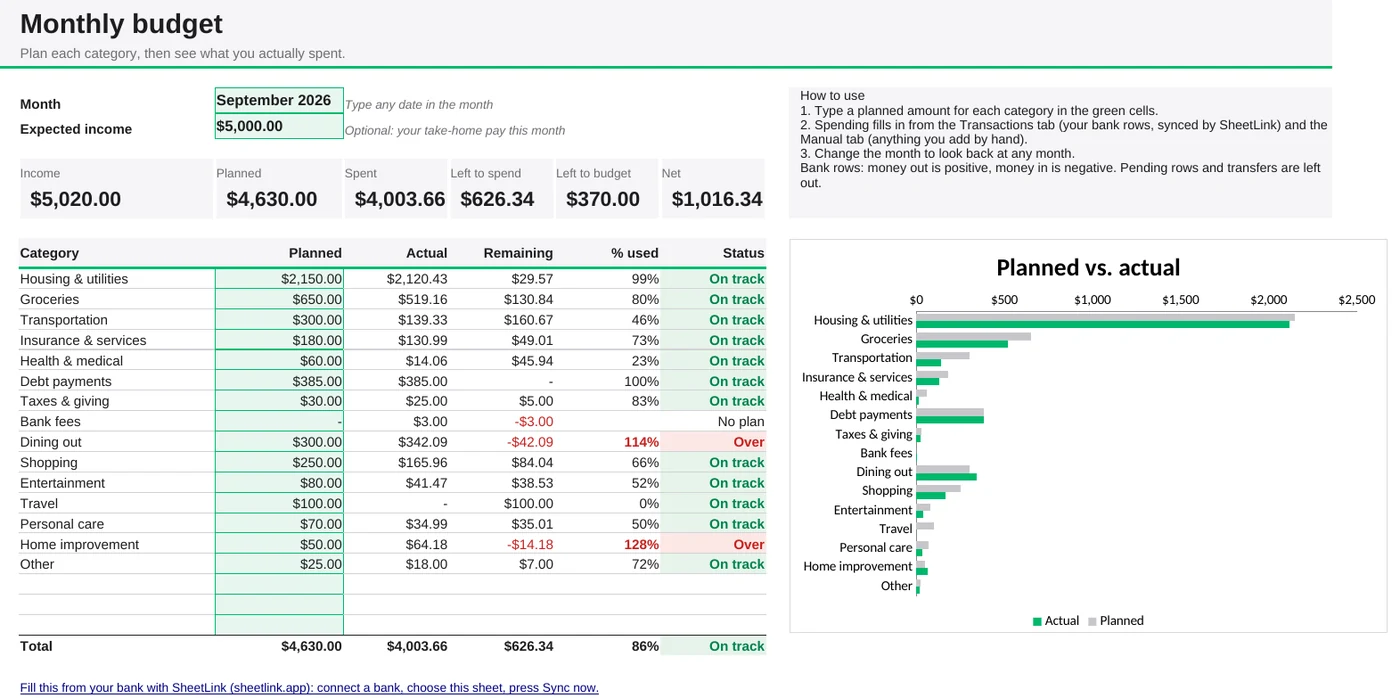
Plan an amount for each category, then see planned vs. actual for any month: what you've spent, what's left to spend, and which categories are over. Summary cards show your income, planned, spent and net, and a chart compares planned and actual side by side.
- Type the month and a planned amount for each category in the green cells.
- Add spending on the Manual tab, or let SheetLink fill the Transactions tab from your bank.
- Change the month to look back at any past month.
Make a copy in Google Sheets or download it for Excel.
2. 50/30/20 budget template
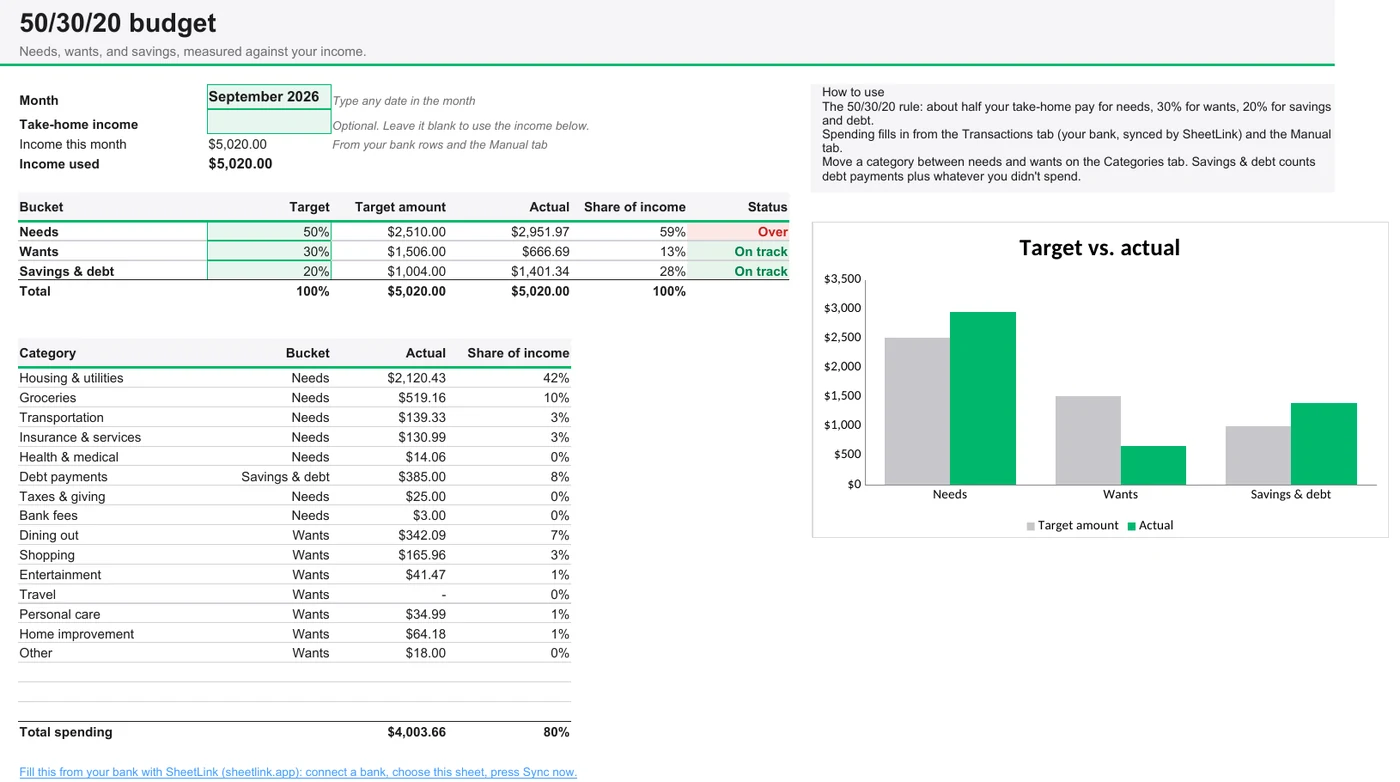
The 50/30/20 rule puts about half your take-home pay toward needs, 30% toward wants and 20% toward savings and debt. This template sorts every category into one of the three and shows how each compares with its target. Savings and debt counts your debt payments plus whatever you didn't spend.
- Type the month, and your take-home pay if you'd rather not use the income in your bank rows.
- Move a category between needs and wants on the Categories tab.
Make a copy in Google Sheets or download it for Excel.
3. Annual budget template
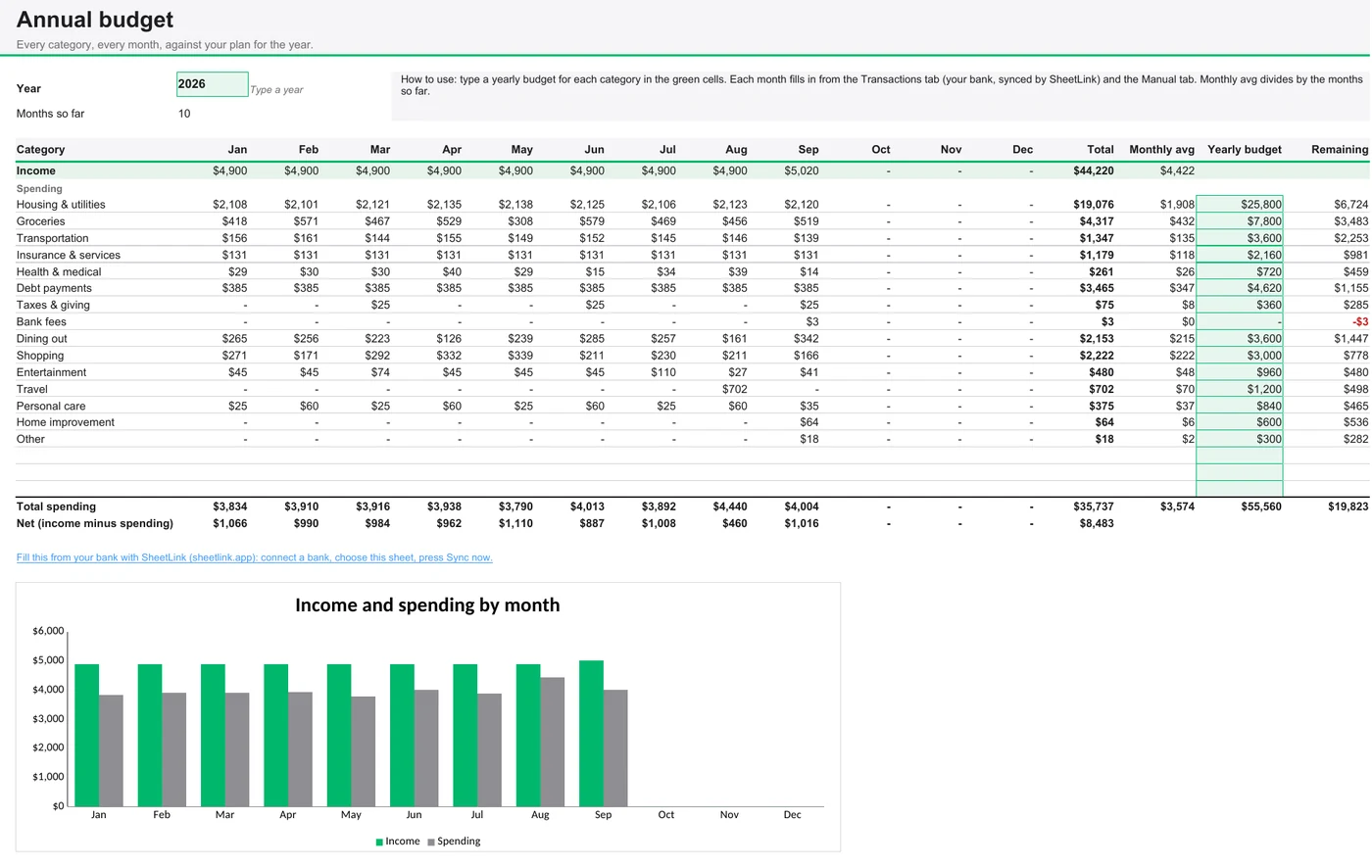
Every category across all 12 months, with your income on top, yearly totals, monthly averages and a yearly plan to measure against. Good for spotting seasonal costs and setting next year's budget.
- Type the year and, optionally, a yearly budget for each category.
- Every month fills in from your Manual entries and bank rows.
Make a copy in Google Sheets or download it for Excel.
4. Subscription and recurring spending tracker
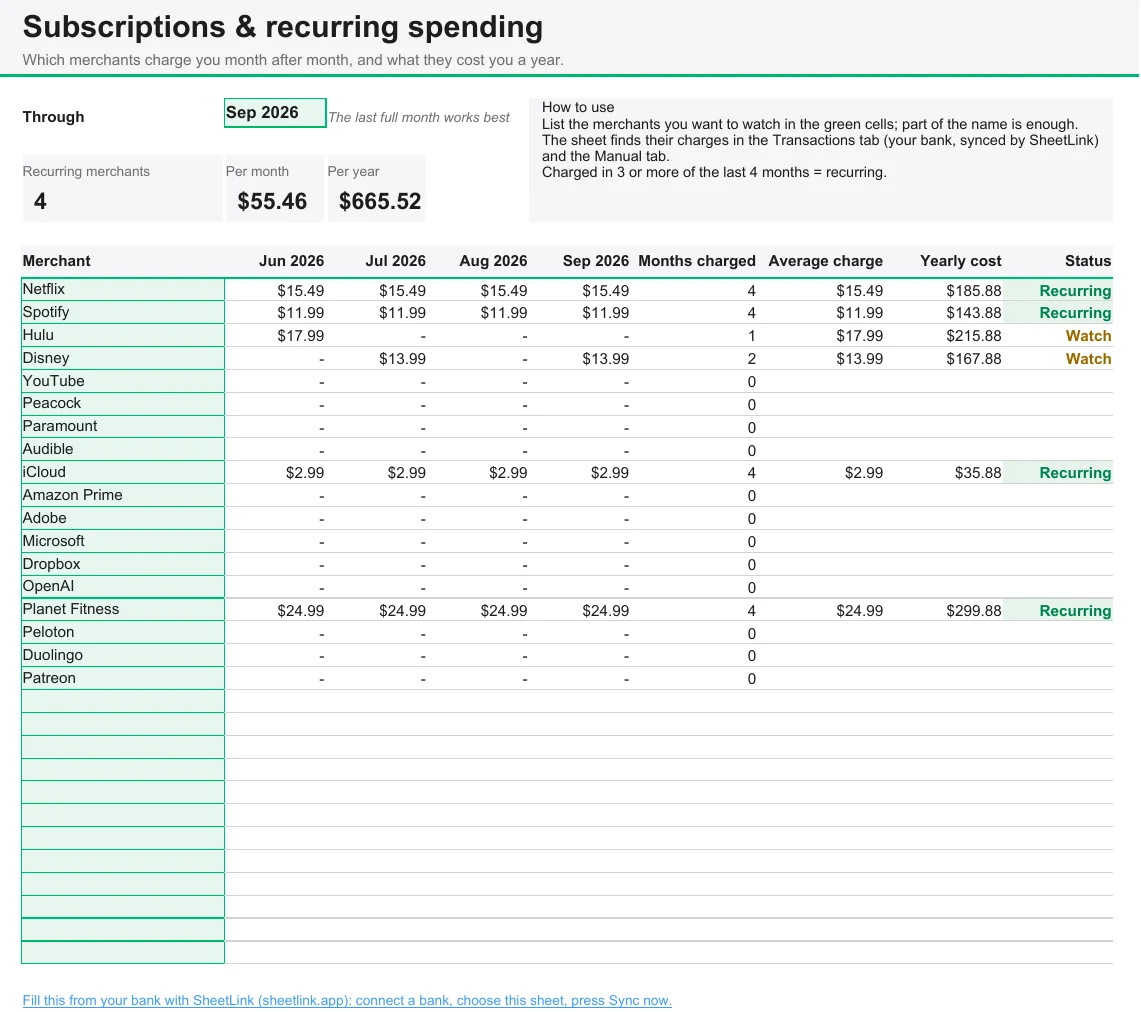
List the merchants you suspect you pay every month, from streaming services to the gym, and the tracker checks the last four months. Anything charged in at least three of them is flagged as recurring, with its average charge and what it costs you a year.
- Edit the merchant list: 18 common ones are filled in to start.
- The yearly cost column is usually the eye-opener.
Make a copy in Google Sheets or download it for Excel.
5. Expense tracker template
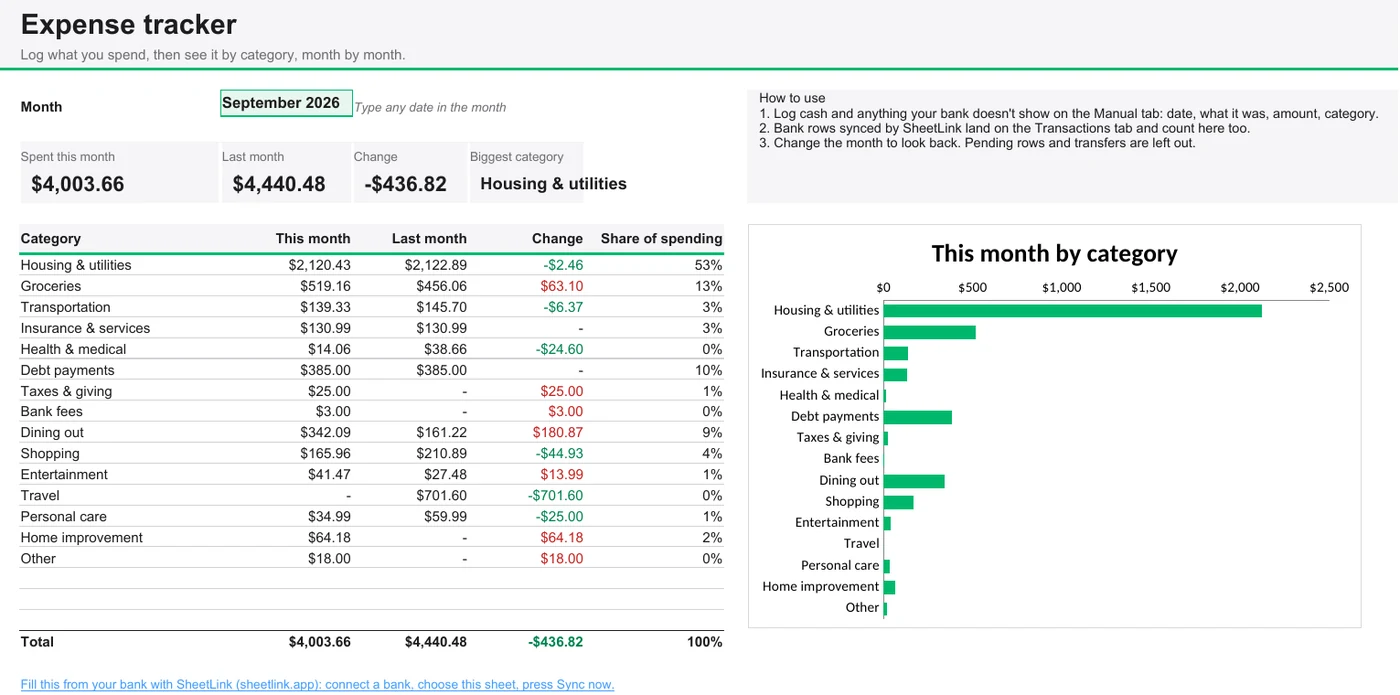
Not ready for a full budget? Log what you spend and the tracker compares this month with last month by category, shows each category's share, and names your biggest one.
- Log expenses on the Manual tab, or sync them from your bank.
Make a copy in Google Sheets or download it for Excel.
How to make a monthly budget in Google Sheets
Copy the template
Use the Make a copy link above. You get your own editable Google Sheet in your Drive.
Plan each category
Type a planned amount for each category in the green cells. Start from last month's spending if you're not sure.
Record your spending
Type purchases on the Manual tab, or connect your bank with SheetLink so transactions fill in.
Check in every week
Compare planned and actual, and adjust next month's plan where you keep going over.
Fill a template from your bank
Typing in every purchase is where most budgets stall. Every template here already has a Transactions tab with the 34 columns SheetLink writes, so you can fill it from your bank instead:
Install SheetLink and connect your bank
Add the Chrome extension, sign in with Google, and connect your bank through Plaid on the Banks tab.
Choose your copy of the template
Open your copy, then choose Use this sheet on SheetLink's Sync tab. SheetLink writes into the sheet you choose and never creates one.
Press Sync now
New transactions land at the end of the Transactions tab and every summary updates. Rows already in the sheet are skipped, so sync whenever you like.
Tip
Leave the Transactions and Accounts tabs' header rows as they are. SheetLink checks them before it writes, and pauses if they've changed.
SheetLink's Free plan covers one bank and your last 7 days. Pro, at $4.99 a month or $39.99 a year, adds every bank you connect, up to 2 years of history, and the Excel add-in, which fills the .xlsx versions the same way.
How the templates handle your bank data
- Categories come mapped. The Categories tab maps Plaid's categories to budget lines, splits groceries from dining out, and treats credit card payments as transfers so card spending isn't counted twice. Rename lines or remap a category there.
- Pending and transfers are left out. Spending only counts posted transactions, and moving money between your own accounts isn't spending.
- Signs follow the bank. Money out is positive and money in is negative, on the Manual tab too.
Questions
How do I create a monthly budget in Google Sheets?
The quickest way is to copy a template. Copy the monthly budget template on this page, type the month and a planned amount for each category, then record your spending on the Manual tab, or connect your bank with SheetLink so transactions fill in. The template compares planned and actual for each category and shows what's left to spend.
What is the best budget template in Google Sheets?
It depends on how you budget. A monthly budget with planned and actual amounts per category suits most people. The 50/30/20 template is simpler: it only checks needs, wants and savings against your income. The annual budget shows your whole year, and the subscription tracker finds what you pay for every month.
Does Google have a budget template?
Yes. Google Sheets' template gallery (File > New > From template gallery) includes a basic Monthly budget and an Annual budget. They track amounts you type in. The templates here add categories mapped to bank data, a 50/30/20 view, a subscription tracker, and the option to fill them from your bank.
Where can I find a free template for a monthly budget?
Right here: the monthly budget template on this page is free, and the copy link makes your own editable copy in one click, with no email or sign-up. There's also an Excel version to download.
Are these templates really free?
Yes. Each copy link makes your own Google Sheet in your Google account, and the Excel files are plain downloads. There's nothing to sign up for and no email to hand over. SheetLink, which can fill them from your bank, is optional and has a free plan.
Can I connect my bank account to a Google Sheets budget template?
Yes. Each template already has the Transactions tab that SheetLink writes to. Open your copy, choose it in SheetLink with Use this sheet, and press Sync now: your bank transactions land in the Transactions tab and every summary updates. SheetLink's Free plan covers one bank and your last 7 days; Pro adds every bank and up to 2 years.
Do these templates work in Excel?
Yes. Download the .xlsx version of any template and open it in Excel. The formulas use only functions that work the same in Excel and Google Sheets, and SheetLink's Excel add-in (Pro) can fill them from your bank. Our free Excel budget templates guide covers the Excel side step by step.